

Magi: understand exactly how your agent thinks and performs
Now in Agent Designer for every Maven customer. Ask why your agent did something, or how it's performing, and get the answer on the page you're already on, grounded in the reasoning the agent actually used.

A lot of teams are building their first AI agent right now. Plenty of others are on their second try, after an agent from another vendor didn’t live up to the pitch.
Either way, the same question comes up fast: is it actually working? The agent is live and talking to customers, but it’s hard to tell which conversations went well, which went sideways, and why. Performance shows up as a few top-line numbers, and understanding what’s behind them takes time most teams don’t have.
The teams that get real value from AI agents have one thing in common: they understand their agent. They know why it answered the way it did, how it’s performing across every conversation, and what to fix next.
That’s what Magi is for: an AI assistant built into Agent Designer, now on for every Maven customer. It replaces Ask Maven, rebuilt from the ground up as a more capable assistant: everything you asked Ask Maven works in Magi, from every page.
Where Magi lives
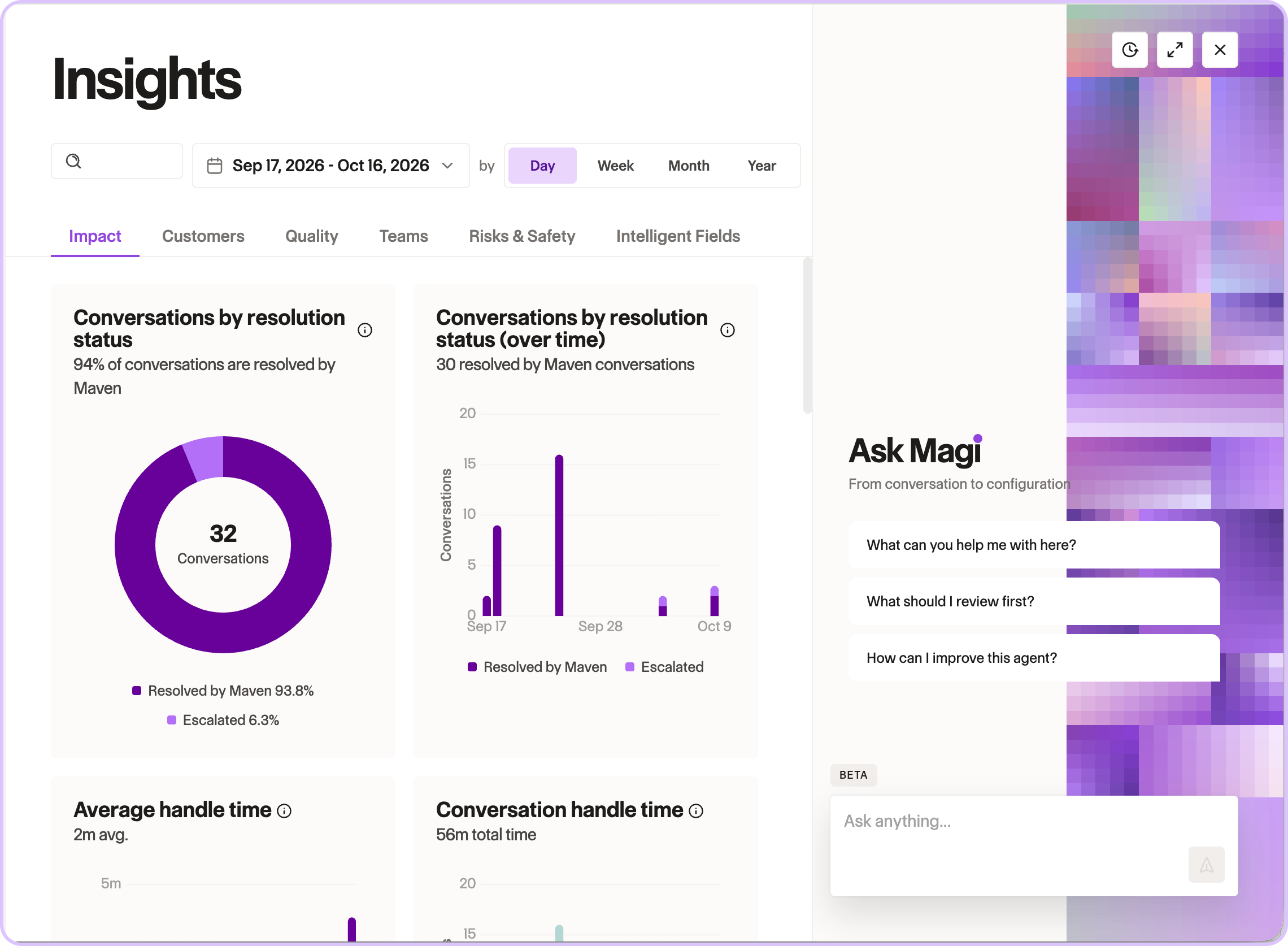
Magi lives in the circle in the lower right corner of Agent Designer, on every page. Click it and Magi opens beside whatever you're working on. It sees the page you're on, so it knows which conversation, charter, capability, or anything else you're looking at. You ask in plain language. It answers in place, so you never leave the page or pull a report.
The questions Magi answers
"Why did the agent say that?"
This is where Magi goes deepest. Magi reads any conversation in full: the transcript, the AI summary, and the reasoning trace behind every message. It can tell you which knowledge and actions the agent looked at versus actually used, which charters and segments matched, and which safety checks fired. Then it explains, based on what the agent actually saw, why a specific reply came out the way it did.
Say a customer asked about tuition and the agent couldn't answer. Open the conversation, ask Magi, and it names the charters that matched and the actions attached to them. Now you know where to look.
"Why was this action never offered?"
Magi reasons across your whole configuration, not one page at a time. It can tell you whether a charter is even being evaluated, which charters make an action or knowledge base available, what a segment's conditions mean, and the exact description the agent reads when it picks a tool. Questions that span several screens get one answer.
"Is it actually working?"
Ask for data, like handoffs by channel this month, and Magi builds the query and draws the table or chart right in the Magi panel. It covers volume and mix by category, tag, channel, language, segment, or charter. It also covers quality and outcomes like resolution, containment, and sentiment, plus handle time, feedback, product events, and intelligent field trends. Ask for the conversations behind any number and Magi pulls them up.
"What should I fix first?"
Magi reads your Inbox, the platform's running list of what needs attention: missing knowledge, duplicate documents, and custom items. A missing-knowledge item names the gap directly, so you know exactly what to add.
"Find that conversation and take me there."
Magi finds anything in your agent: conversations, end users, knowledge, sync status, apps, and events. It also moves you to any page, app, capability, charter, knowledge base, document, or conversation.
"Help me tighten this action description."
Magi sees what's on your screen, including edits you haven't saved yet. Ask it to review a charter draft before you save it, or to tighten the description the agent reads when it decides whether to use an action. Magi suggests the wording, and you decide what to save.
"How do I connect this to our systems?"
Developers can ask Magi for help with integration code, such as connecting an app to your agent, and get an answer without leaving Agent Designer.
Built to be trusted
- Scoped to one agent. Magi only sees the agent you have open, never the others in your organization.
- No secrets. App credentials are redacted before Magi sees anything. It reads an app's public description, never its API keys.
- Sensitive numbers are masked. Card, Social Security, bank, and ID numbers you type are masked before Magi reads them.
- Read-only today. Magi reads, investigates, and answers. It doesn't change your agent.
- Shows its work. Ask for the conversations behind any number, and every explanation is based on the reasoning the agent actually used.
If you already use Maven, look for the Magi button in the bottom right corner of Agent Designer. The Magi docs cover everything it can do. If you're new to Maven, book a demo and we'll show you what it's like to ask your agent why.


Don’t be Shy.
Make the first move.
Request a free personalized demo.